
API request builder - A free, fast, and beautiful alternative to Postman
Helps you create your requests faster, saving you precious time on your development - Subscribe
[](https://travis-ci.com/liyasthomas/postwoman) [](https://github.com/liyasthomas/postwoman/releases/latest) [](https://postwoman.io) [](CONTRIBUTING.md) [](#contributors) [](https://opencollective.com/postwoman) [](https://www.paypal.me/liyascthomas) [](https://t.me/postwoman_app) [](https://discord.gg/GAMWxmR) [](https://twitter.com/intent/tweet?url=https%3A%2F%2Fpostwoman.io&text=%F0%9F%91%BD%20Postwoman%20%E2%80%A2%20API%20request%20builder%20-%20Helps%20you%20create%20your%20requests%20faster%2C%20saving%20you%20precious%20time%20on%20your%20development&original_referer=https%3A%2F%2Ftwitter.com%2Fshare%3Ftext%3D%25F0%259F%2591%25BD%2520Postwoman%2520%25E2%2580%25A2%2520API%2520request%2520builder%2520-%2520Helps%2520you%2520create%2520your%2520requests%2520faster%2C%2520saving%2520you%2520precious%2520time%2520on%2520your%2520development%26url%3Dhttps%3A%2F%2Fpostwoman.io%26hashtags%3Dpostwoman%26via%3Dliyasthomas&via=liyasthomas&hashtags=postwoman)
Built with ❤︎ by
liyasthomas and
contributors
---
**Read: _[Story behind Postwoman](https://dev.to/liyasthomas/i-created-postwoman-an-online-open-source-api-request-builder-41md), [Postwoman v1.0](https://dev.to/liyasthomas/postwoman-v1-0-a-free-fast-beautiful-alternative-to-postman-mn0)_**
**Chat: _[Telegram](https://t.me/postwoman_app), [Discord](https://discord.gg/GAMWxmR)_**
**Donate: _[PayPal](https://www.paypal.me/liyascthomas), [Open Collective](https://opencollective.com/postwoman), [Patreon](https://www.patreon.com/liyasthomas)_**
### Features ✨
❤️ **Lightweight**: Crafted with minimalistic UI design - simple design is the best design.
⚡️ **Fast**: Send requests and get/copy responses in real-time - fast software is the best software.
**Methods:**
- `GET` - Retrieve information about the REST API resource
- `HEAD` - Retrieve response headers identical to those of a GET request, but without the response body.
- `POST` - Create a REST API resource
- `PUT` - Update a REST API resource
- `DELETE` - Delete a REST API resource or related component
- `CONNECT` - Establishes a tunnel to the server identified by the target resource
- `OPTIONS` - Describe the communication options for the target resource
- `TRACE` - Performs a message loop-back test along the path to the target resource
- `PATCH` - Apply partial modifications to a REST API resource
- `` - Some APIs use custom request methods such as `LIST`. Type in your custom methods.
🌈 **Make it yours**: Customizable combinations for background, foreground and accent colors: because customization is freedom. [Customize now ✨](https://postwoman.io/settings).
**Customizations:**
- Choose theme: Kinda Dark (default), Clearly White, Just Black and System theme
- Choose accent color: Green (default), Yellow, Pink, Red, Purple, Orange, Cyan and Blue
- Toggle multi-colored headings
_Customized themes are synced with local session storage_
🔥 **PWA**: Install as a [PWA](https://developers.google.com/web/progressive-web-apps) on your device.
**Features:**
- Instant loading with [Service Workers](https://developers.google.com/web/fundamentals/primers/service-workers)
- Offline support
- Low RAM/memory and CPU usage
- [Add to Home Screen](https://developers.google.com/web/fundamentals/app-install-banners) (button in footer)
- [Desktop PWA](https://developers.google.com/web/progressive-web-apps/desktop) support (button in footer)
- ([full features](https://developers.google.com/web/progressive-web-apps))
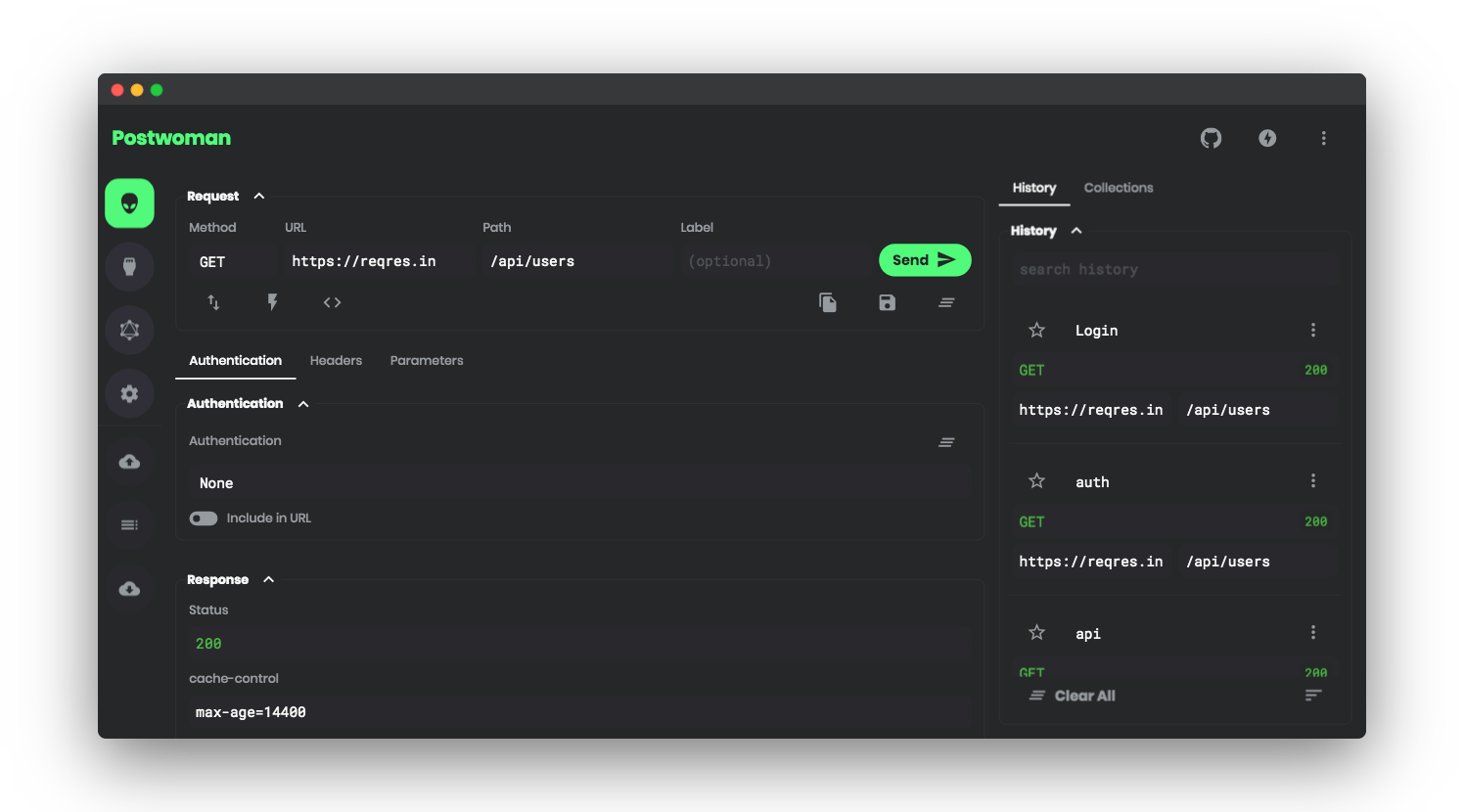
🚀 **Request**: Retrieve response from endpoint instantly.
- Choose `method`
- Enter `URL` and `Path`
- Send
**Features:**
- Copy/share public "Share URL"
- Generate request code for `JavaScript XHR`, `Fetch` and `cURL`
- Copy generated request code to clipboard
- Import `cURL`
- Label requests
🔌 **WebSocket**: Establish full-duplex communication channels over a single TCP connection.
- Send and receive data
- Basic authentication using username and password
- Token based authentication
📡 **Server Sent Events**: Receive a stream of updates from a server over a HTTP connection without resorting to polling.
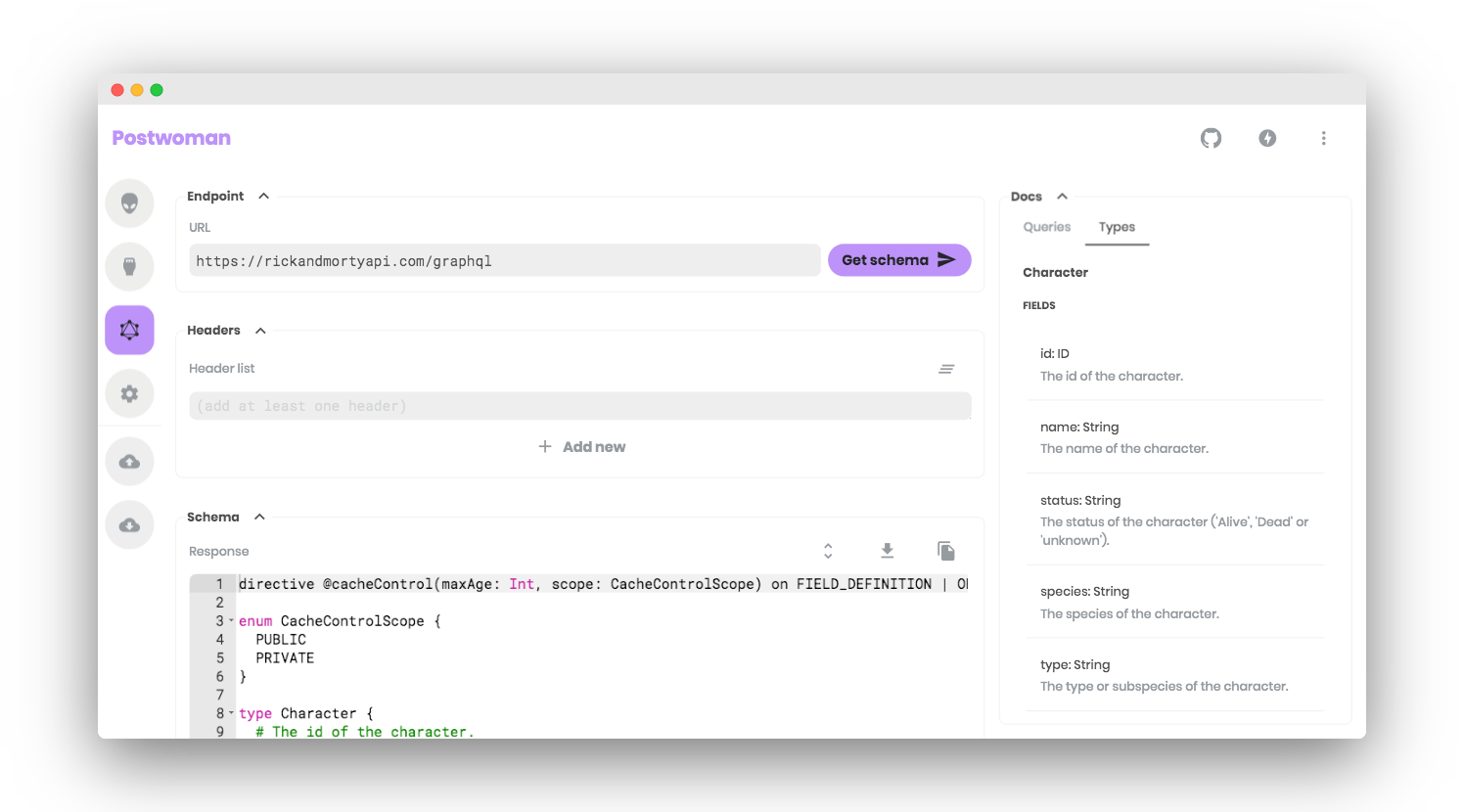
🌍 **GraphQL**: GraphQL is a query language for APIs and a runtime for fulfilling those queries with your existing data.
- Set endpoint and get schemas
- Multi-column docs
- Set custom request headers
- Query schema
- Get query response
🔐 **Authentication**: Allows to identify the end user.
**Types:**
- None
- Basic authentication using username and password
- Token based authentication
📢 **Headers**: Describes the format the body of your request is being sent as.
- Add or remove Header list
📫 **Parameters**: Use request parameters to set varying parts in simulated requests.
📃 **Request Body**: Used to send and receive data via the REST API.
**Options:**
- Set `Content Type`
- Add or remove Parameter list
- Toggle between key-value and RAW input Parameter list
👋 **Responses**: Contains the status line, headers and the message/response body.
- Copy response to clipboard
- Download response to as a file
- View preview of HTML responses
⏰ **History**: Request entries are synced with local session storage to reuse with a single click.
**Fields:**
- Star
- Label
- Method
- Status code
- URL
- Path
- Timestamp
- Duration
- Pre-request script
_History entries can be sorted by any fields_
_Histories can be deleted one-by-one or all together_
📁 **Collections**: Keep your API requests organized with collections and folders. Reuse them with a single click.
**Options:**
- Create infinite collections, folders and requests
- Edit, delete, move, export, import and replace
_Collections are synced with local session storage_
🌐 **Proxy**: Enable Proxy Mode from Settings to access blocked APIs.
**Features:**
- Hide your IP address
- Fixes [CORS](https://developer.mozilla.org/en-US/docs/Web/HTTP/CORS) (Cross Origin Resource Sharing) issues
- Access APIs served in non-HTTPS (`http://`)
- Use custom Proxy URL
_Official Postwoman Proxy is hosted by ApolloTV - [Privacy policy](https://apollotv.xyz/legal)_
📜 **Pre-Request Scripts**: Snippets of code associated with a request that are executed before the request is sent.
**Use-cases:**
- Include timestamp in the request headers
- Send a random alphanumeric string in the URL parameters
_Requests with Pre-Request Scripts are indicated in History entries_
⌨️ **Keyboard Shortcuts**: Optimized for efficiency.
**Shortcuts:**
- Send Request Ctrl + G
- Save to Collections Ctrl + S
- Copy Request Link Ctrl + K
- Reset Request Ctrl + L
🌎 **i18n**: Internationalization β.
- Add a new locale in `lang/`
Example: `lang/es-ES.js`
- Mention `code`, `name`, `iso` and `file` in `nuxt.config.js`
Example:
```
i18n: {
locales: [{
code: 'es',
name: 'Español',
iso: 'es-ES',
file: 'es-ES.js'
}]
}
```
_**All `i18n` contributions are welcome to `i18n` [branch](https://github.com/liyasthomas/postwoman/tree/i18n) only!**_
**To find out more, please check out [Postwoman Wiki](https://github.com/liyasthomas/postwoman/wiki).**
## Demo 🚀 [](https://postwoman.io)
[https://postwoman.io](https://postwoman.io)
## Usage 💡
1. Specify your request `method`
2. Type in your API `URL` and `path`
3. Send request
4. Get response
You're done!
## Built with 🔧
* [Chromium](https://github.com/chromium/chromium) - Thanks for being so fast!
* HTML - For the web framework
* CSS - For styling components
* JavaScript - For magic!
* [Vue](https://vuejs.org/) - To add to the JavaScript magic!
* [Nuxt](https://nuxtjs.org/) - To add to the Vue magic!
## Developing 👷
1. [Clone this repo](https://help.github.com/en/articles/cloning-a-repository) with git.
2. Install dependencies by running `npm install` within the directory that you cloned (probably `postwoman`).
3. Start the development server with `npm run dev`.
4. Open development site by going to [http://localhost:3000](http://localhost:3000) in your browser.
#### Or, with docker-compose:
1. [Clone this repo](https://help.github.com/en/articles/cloning-a-repository) with git.
2. Run `docker-compose up`
3. Open development site by going to [http://localhost:3000](http://localhost:3000) in your browser.
## Docker 🐳 [](https://hub.docker.com/r/liyasthomas/postwoman)
```bash
#pull
docker pull liyasthomas/postwoman
#run
docker run -p 3000:3000 liyasthomas/postwoman:latest
#build
docker build -t postwoman:latest
```
## Releasing 🏷️
1. [Clone this repo](https://help.github.com/en/articles/cloning-a-repository) with git.
2. Install dependencies by running `npm install` within the directory that you cloned (probably `postwoman`).
3. Build the release files with `npm run build`.
4. Find the built project in `./dist`.
## Contributing 🍰
Please read [CONTRIBUTING](CONTRIBUTING.md) for details on our [CODE OF CONDUCT](CODE_OF_CONDUCT.md), and the process for submitting pull requests to us.
## Continuous Integration 💚 [](https://travis-ci.com/liyasthomas/postwoman)
We use [Travis CI](https://travis-ci.com) for continuous integration. Check out our [Travis CI Status](https://travis-ci.com/liyasthomas/postwoman).
## Versioning 🔖 [](https://github.com/liyasthomas/postwoman/releases/latest)
This project is developed by [Liyas Thomas](https://github.com/liyasthomas) using the [Semantic Versioning specification](https://semver.org). For the versions available, see the [releases on this repository](https://github.com/liyasthomas/postwoman/releases).
## Change log 📝
See the [CHANGELOG](CHANGELOG.md) file for details.
## Authors 🔮
### Lead Developers
* **[Liyas Thomas](https://github.com/liyasthomas)** - *Author*
* **[Caneco](https://twitter.com/caneco)** - *Designer*
### Testing and Debugging
* ([contributors](https://github.com/liyasthomas/postwoman/graphs/contributors))
### Collaborators
See the list of [contributors](https://github.com/liyasthomas/postwoman/graphs/contributors) who participated in this project.
### Thanks
* [dev.to 👩💻👨💻](https://dev.to)
### Code Contributors
This project exists thanks to all the people who contribute. [[Contribute](CONTRIBUTING.md)].
 ### Financial Contributors
Become a financial contributor and help us sustain our community. [[Contribute](https://opencollective.com/postwoman/contribute)]
#### Individuals
### Financial Contributors
Become a financial contributor and help us sustain our community. [[Contribute](https://opencollective.com/postwoman/contribute)]
#### Individuals
 #### Organizations
Support this project with your organization. Your logo will show up here with a link to your website. [[Contribute](https://opencollective.com/postwoman/contribute)]
#### Organizations
Support this project with your organization. Your logo will show up here with a link to your website. [[Contribute](https://opencollective.com/postwoman/contribute)]


 ## License 📄
This project is licensed under the [MIT License](https://opensource.org/licenses/MIT) - see the [LICENSE](LICENSE) file for details.
## Acknowledgements 🙏
* Hat tip to anyone whose code was used
* Inspirations:
* [Dribbble](https://dribbble.com)
## Badges
## License 📄
This project is licensed under the [MIT License](https://opensource.org/licenses/MIT) - see the [LICENSE](LICENSE) file for details.
## Acknowledgements 🙏
* Hat tip to anyone whose code was used
* Inspirations:
* [Dribbble](https://dribbble.com)
## Badges
[](https://postwoman.io)
Default
```
[](https://postwoman.io)
```
---
[](https://postwoman.io)
Success
```
[](https://postwoman.io)
```
---
[](https://postwoman.io)
Critical
```
[](https://postwoman.io)
```
---
[](https://postwoman.io)
Custom
```
[](https://postwoman.io)
```
---
[](https://postwoman.io)
Customize
```
[](https://postwoman.io)
```

Happy Coding ❤︎


